svcensus1 <-
   svcensus[,c(1,4,6)]  # age, wage, gender
z <- dsldLinear(svcensus1,'wageinc','gender')
coef(z)  # print the estimated coefficients b_i
$gender
(Intercept) age gendermale
31079.9174 489.5728 13098.2091 How do we adjust for confounders? The most common approach involves linear models, with which we express the mean Y for given values of the X, C and S variables in a linear form.
The relation of mean Y to the X, C (or O) and S variables, that is the conditional mean of Y given the other variables, is formally called the regression function of Y on those variables. Our first model below, which expresses mean income as a function of age and gender, will assume this relation as linear, but the term regression function is general.
Indeed, one commonality between statistics and machine learning (ML) methods is that both types of analysis typically involve estimation of the regression function, even though they differ in the uses to which they put such estimates: In statistics, the goal can be either effect estimation (e.g. the impact of gender on wages) or prediction, while the latter is almost always the goal of ML.
Consider the svcensus data example in Section 1.2 above, investigating a possible gender pay gap. So Y is wage and S is gender. We might treat age as a confounder C, reasoning as follows. Older workers tend to have more experience and thus higher wages, and if there is an age differential in our data, say with female workers tending to be older, this may mask a gender pay gap: If men make more money than women of the same age, but women tend to be older, the gender and age effects may largely cancel out.
So, let’s take the set of confounders C to consist of age, and for simplicity in this introductory example, not include any other confounders, such as occupation, and not include any other variables X.
Our linear model would thus be
mean W = \beta_0 + \beta_1 A + \beta_2 M
where W is wage, A is age and M is an indicator variable, with M = 1 for men and M = 0 for women. The parameters \beta_i are estimated by fitting the model to the data:
svcensus1 <-
svcensus[,c(1,4,6)] # age, wage, gender
z <- dsldLinear(svcensus1,'wageinc','gender')
coef(z) # print the estimated coefficients b_i $gender
(Intercept) age gendermale
31079.9174 489.5728 13098.2091 The familiar R lm function is called behind the scenes, but the call includes an additional argument S, in this case gender. This is a theme common to many dsld functions: A call to these functions ultimately translates to calls to functions in base R or other packages – but with extra discrimination-specific information in the input and output.
Let’s use bi to denote our estimated \beta_i. So for instance b1 = 489.5728 is our estimate of the unknown population parameter \beta_1.
Lots in the output to discuss, which we will gradually cover below. For now, note that the estimate b2 turns out to be about $13,000, which is the (estimated) wage gap, if any. Here’s why:
Under the model, the mean wage for, say, 36-year-old men is
\beta_0 + 36 \beta_1 + 1 \beta_2
while for women of that age it is
\beta_0 + 36 \beta_1
The difference is \beta_2. But if we look at, for instance, people of age 43, the mean wages for men and women are
\beta_0 + 43 \beta_1 + 1 \beta_2
and
\beta_0 + 43 \beta_1
and the difference is still \beta_2.
Thus we can speak of \beta_2 as the gender wage gap, at any age. According to the model, younger men earn an estimated $13,000 more than younger women, with the same-sized gap between older men and older women.
The above approach to dealing with confounders is a very common one. But it raises questions, such as:
What are the assumptions underlying that model? And how might we check whether they are (approximately) valid?
We chose only one C variable here, age. We might also include occupation, as noted earlier. In some datasets, might have dozens of possible confounders. How do we choose which ones to use in our model? And for that matter, why not use them all?
The above model, in which the gender wage gap was uniform across all wages, may not be adequate. How can we determine this, and what alternative models might we use?
The full output of dsldLinear() goes to the heart of discrimination analysis, enabling statistical inferences on differences in levels of the sensitive variable S. Let’s take a look, continuing from the above code:
summary(z)$`Summary Coefficients`
Covariate Estimate StandardError PValue
1 (Intercept) 31079.9174 1378.08158 0
2 age 489.5728 30.26461 0
3 gendermale 13098.2091 790.44515 0
$`Sensitive Factor Level Comparisons`
Factors Compared Estimates Standard Errors P-Value
1 male - female 13098.21 790.4451 1.135454e-61The first half of this output is from lm(), which is called by dsldLinear(). The second half is the “value added” material from dsld.
So, an approximate 95% confidence interval for the gender wage gap is
13098.2091 ± 1.96 x 790.4451
or (11548.94,14647.48).
As discussed above, in our model
mean W = \beta_0 + \beta_1 A + \beta_2 M
we identified b2 as the difference in mean wage between men and women, regardless of age, so that for instance:
According to the model, younger men earn about $13,000 more than younger women, with the same-sized gap between older men and older women.
But that may not be true. On the contrary, gender discrimination and age discrimination may interact. It may be, for instance, that the gender gap is small at younger ages but much larger for older people.
Technically, the with-interactions model adds a product term:
mean W = \beta_0 + \beta_1 A + \beta_2 M + \beta_3 AM
So for example, the gender pay gap for people of age 36 is
(\beta_0 + \beta_1 36 + \beta_2 1 + \beta_3 36) - (\beta_0 + \beta_1 36 ) =
\beta_2 1 + \beta_3 36
And at age 43, the gap is
\beta_2 1 + \beta_3 43
So, this model does indeed allow for interaction between age and gender.
However, this added-product-term is a bit abstract, and it is easier (and approximately equivalent) to simply fit two linear models, one for men and one for women.
The dsldLinear function includes an argument interactions. The default value is FALSE, but if TRUE, it fits separate linear models for each level of S. An additional argument ‘sComparisonPts’ is now needed, through which the user specifies a data frame consisting of one or more (X,C) values at which to compare the effect of S.
newData <- data.frame(age=c(36,43))
z <- dsldLinear(svcensus1,'wageinc','gender',interactions=T,
   sComparisonPts = newData)
summary(z)
$female
Covariate Estimate StandardError PValue
1 (Intercept) 30551.4302 2123.44361 0
2 age 502.9624 52.07742 0
$male
Covariate Estimate StandardError PValue
1 (Intercept) 44313.159 1484.82216 0
2 age 486.161 36.02116 0
$`Sensitive Factor Level Comparisons`
Factors Compared New Data Row Estimates Standard Errors
1 female - male 1 -13156.88 710.9696
2 female - male 2 -13039.27 710.7782In setting that sComparisonPts argument, we need one column for every variable other than Y and S. In this case, there is just one such variable, age. So, in the above call, we are fitting two linear models, one for men and another for women, then comparing regression function values at the two specified ages.
So the gender pay gap is estimated to be -13156.88 at age 36, and -13039.27 at age 43, differing by only about $100. The estimated gap between ages 36 and 53, not shown, is larger, close to $300, but it seems there is not much interaction here. The no-interactions model should be adequate after all.
As noted, linear models are ubiquitous in observational data analysis. Open any professional journal in medicine, sociology, economics and so on, and you’ll see many applications of this methodology. But how would one check that most basic assumption, the linearity of the mean Y for given X, C (or O) and S values?
Assumptions matter. They are never perfectly satisfied, but failure to be even approximately valid can mean deciding that there is no discrimination when it actually is there, or vice versa. It can mean bad medication being declared by the government as good, or vice versa. In litigation, if a key expert witness is exposed by opposing counsel as not having checked the assumptions in his/her analysis, the side for which the witness was testifying will likely lose the case on the spot.
Typically, linearity is checked graphically. A common approach involves plotting the residuals, which are the differences between the fitted line and the Y values. Here, though, we use another graphical approach, via a dsld function that may be more informative.
Returning to our earlier setting with just S = gender for our example, we run
dsldConditDisparity(svcensus1,'wageinc','gender','age')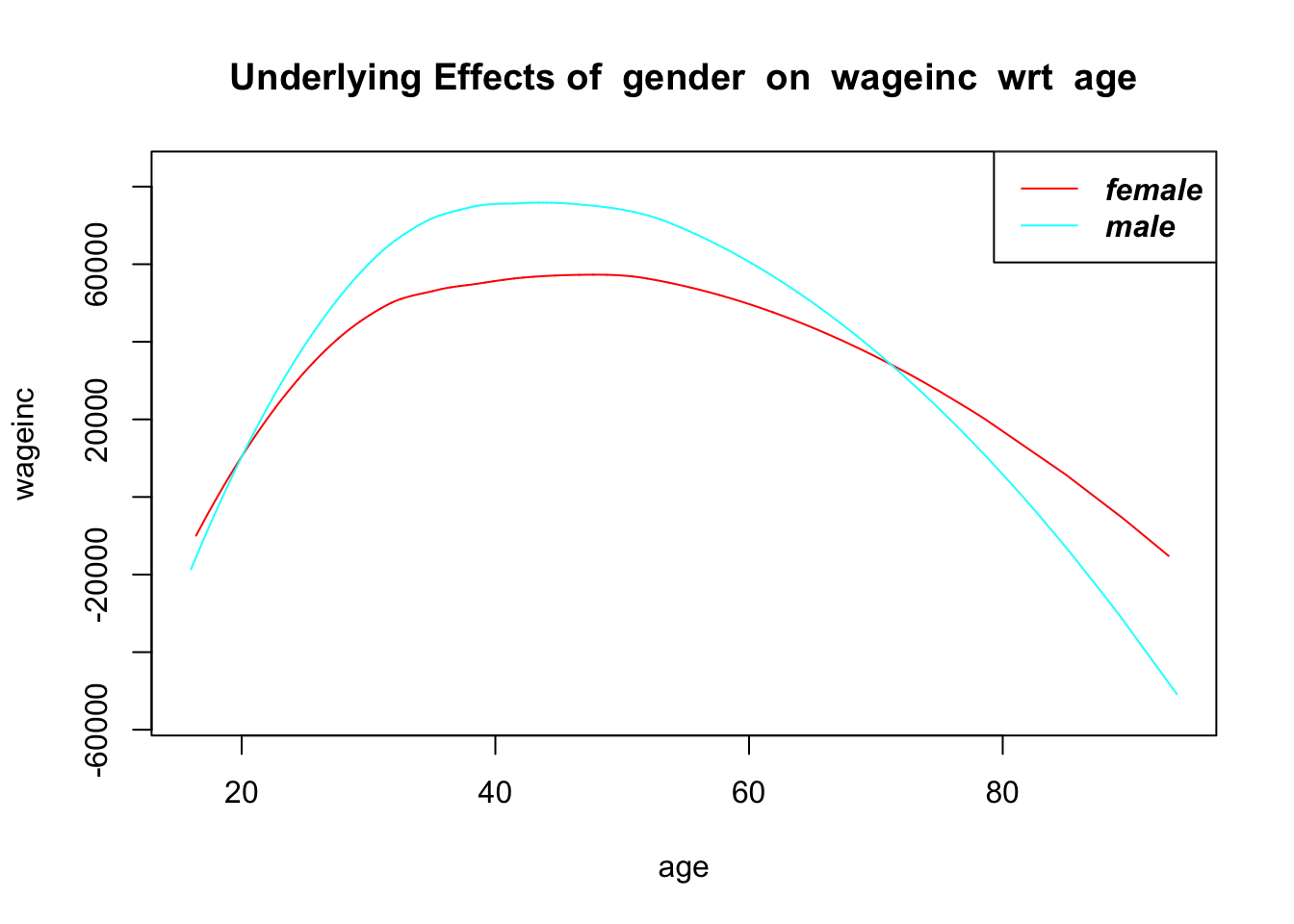
The function plots a smoothed graph of Y against a user-specified C variable, once for each level of S. “Smoothing” here groups data points of similar age, and plots their average Y value. So, the call here says, “Plot smoothed wage income against age, for each gender.”
The model has mean Y being a linear function of age, so we should expect to see approximate straight lines here. Yet the relation certainly looks nonlinear, possibly reflecting age discrimination against both very young and very old workers. We are already investigating one kind of discrimination here, gender, so again for simplicity let’s just keep age as a confounder C rather than a sensitive variable S.
But we must do something about the substantial nonlinearity we’ve discovered, and one possible remedy is to add an age2 term to the equation:
mean W = \beta_0 + \beta_1 A + \beta_2 A2 + \beta_3 M
Let’s fit the updated model:
svcensus1$age2 <- svcensus1$age^2
z <- dsldLinear(svcensus1,'wageinc','gender')
coef(z)  # print the estimated coefficients b_i
$gender
(Intercept) age gendermale age2
-104196.65579 7251.30962 15270.56685 -79.16059 So we see that the original wage gap figure of about $13,000 was incorrect; it’s actually estimated to be over $15,000, so the original model underestimated the gap by about 15%.
We see in this example that misspecifying a linear model can have a major impact on its accuracy. As usual, though, we will try to keep things simple, and thus use only the original linear model in our subsequent examples below.
Other than linearity, the standard errors reported by lm() also assume that variance of wage income is approximately constant across ages and genders. Lack of this property has some effect on the accuracy of reported standard errors, and thus on the validity of confidence intervals and p-values but this can be adjusted via the so-called sandwich operation, an option in dsldLinear().
In introducing this example, we noted the need to start simple. Let’s move away from that a bit.
In the svcensus data, both age and gender are potential areas of discrimination. We can treat both as such by combining these two R factor variables into one “super R factor,” as follows.
We’ll need to discretize age, and since federal law on age discrimination uses age 40 as the definition of “older,” let’s use that as an example:
svc <- svcensus
age <- svc$age
age <- ifelse(age >= 40,'40+','under40')
age <- as.factor(age)
head(age)
[1] 40+ 40+ under40 40+ 40+ 40+
Levels: 40+ under40svc$age <- ageNow let’s make our “super factor,” using a function from qeML:
AgeGend <- cartesianFactor('svc',c('age','gender'))
svc$AgeGend <- AgeGend
head(svc)
age educ occ wageinc wkswrkd gender AgeGend
1 40+ zzzOther 102 75000 52 female 40+.female
2 40+ zzzOther 101 12300 20 male 40+.male
3 under40 zzzOther 102 15400 52 female under40.female
4 40+ zzzOther 100 0 52 male 40+.male
5 40+ zzzOther 100 160 1 female 40+.female
6 40+ zzzOther 100 0 0 male 40+.maleWe have only three education codes here, with 14, 16 and ‘zzzOther’ representing a Master’s degree, PhD and other education levels respectively.
We no longer need the original age and gender columns, so we’ll delete them and then try some analysis:
svc$age <- NULL
svc$gender <- NULL
w <- dsldLinear(svc,'wageinc','AgeGend')
summary(w)
$`Summary Coefficients`
Covariate Estimate StandardError PValue
1 (Intercept) 2482.330 1529.05560 1.044954e-01
2 educ16 8194.121 1717.11275 1.823745e-06
3 educzzzOther -14554.025 747.54506 0.000000e+00
4 occ101 1703.896 899.52840 5.819707e-02
5 occ102 13627.089 829.14115 0.000000e+00
6 occ106 1351.235 2013.86471 5.022422e-01
7 occ140 11409.603 1643.94237 3.910205e-12
8 occ141 11407.453 1039.62019 0.000000e+00
9 wkswrkd 1313.971 20.77242 0.000000e+00
10 AgeGend40+.male 9834.035 1064.86666 0.000000e+00
11 AgeGendunder40.female -8176.053 1229.58483 2.942069e-11
12 AgeGendunder40.male -408.267 1030.00692 6.918298e-01
$`Sensitive Factor Level Comparisons`
Factors Compared Estimates Standard Errors P-Value
1 40+.female - 40+.male -9834.035 1064.8667 2.583056e-20
2 40+.female - under40.female 8176.053 1229.5848 2.942067e-11
3 40+.female - under40.male 408.267 1030.0069 6.918298e-01
4 40+.male - under40.female 18010.088 990.2130 6.413064e-74
5 40+.male - under40.male 10242.302 705.2504 8.672277e-48
6 under40.female - under40.male -7767.786 951.1388 3.166069e-16Ah, this is a more nuanced probe than the ones above in which we simply used age as a confounder. The male-female differences at both the older and younger age levels, about $9800 and $7800, are both substantial, but smaller than the $13,100 overall figure we obtained earlier.
Note too the impact of age within genders. Older women made about $8200 more than younger women, but for men the figure was rather larger, about $10,200.
On the other hand, this analysis is probably too coarse with respect to age, as it does not reveal the negative impact of age well beyond 40. It may be worth trying a finer discretization of age, say, 35-, 35-55 and 55+.
The logistic model is an example of a generalized linear model, whose name stems from it having a linear component in the formula, as will be seen below.
Just as linear models are the most commonly used for numeric Y, in the binary-Y case the go-to standard is the logistic model. To introduce it, let’s first consider a very simple prediction problem, in which Y is gender, say 1 for male, 0 for female, and X is simply income, using the svcensus data (no C here).
Note that mean Y is now the probability that Y = 1. That’s because the average of a bunch of 1s and 0s is the proportion of 1s. In the data 1,0,1,1 for instance, the mean is (1+0+1+1) / 4 = 3/4, and indeed 3/4 of those numbers are 1s; if we were to choose one of those four numbers at random, the probability of obtaining a 1 would be 3/4.
Now, what is the logistic model (often called “logit”), and where does it come from? To motivate this, suppose that within each gender Y, the income level X has a normal (Gaussian) distribution, the familiar “bell-shaped” curve, with the same standard deviation of X within each gender. Then it turns out that one can show mathematically that
probability male = \frac {1}{1 + e^{-(\beta_0 + \beta_1 income)}}
So the probability has a linear component to it, \beta_0 + \beta_1 income, hence the term “generalized” linear model.
That formula follows the form of the logistic function, f(t) = 1 / [1 + e^{-t}], which has the shape of an S-curve:
curve(1/(1+exp(-x)),-4,4)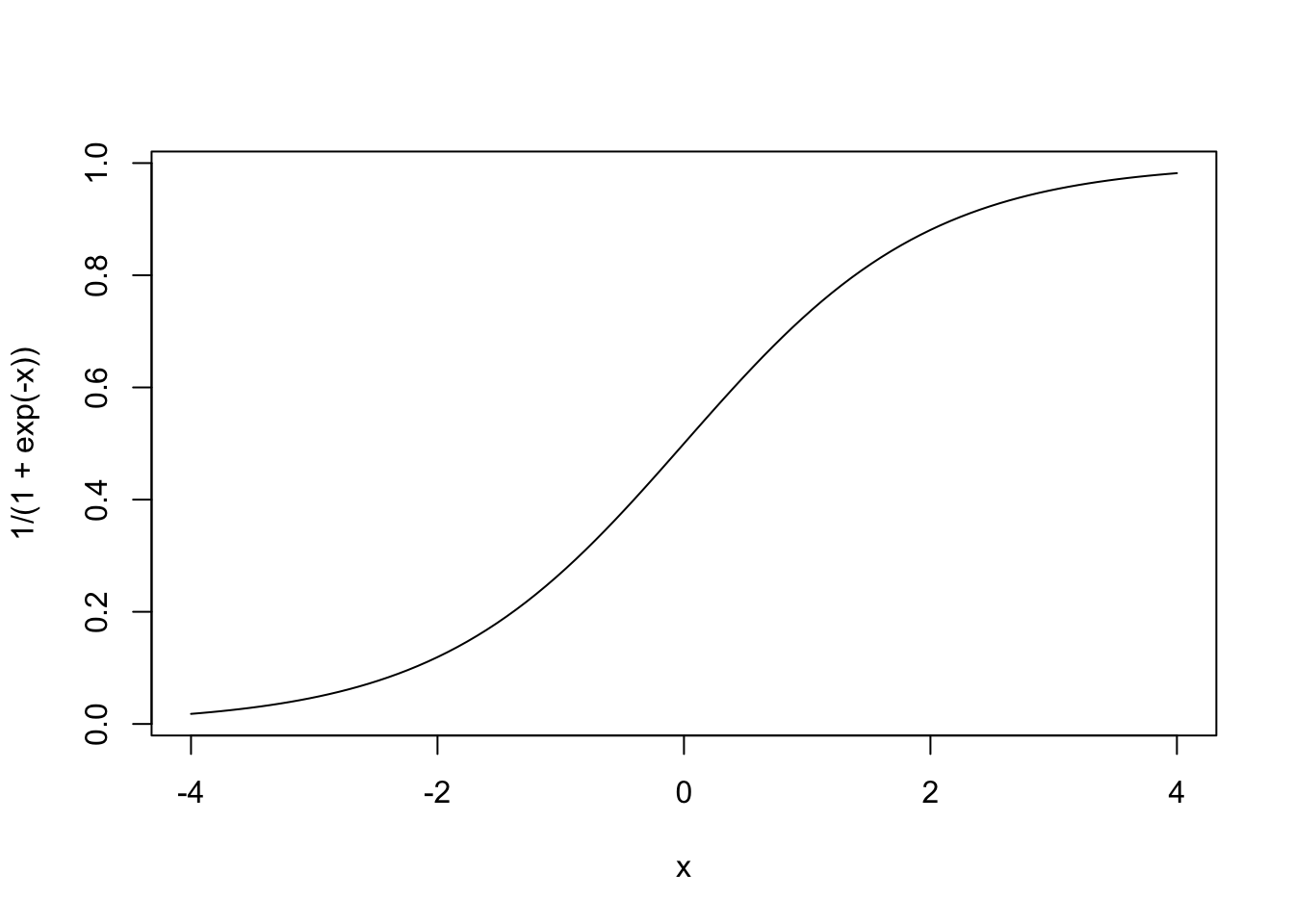
So at least the model retains a linear component, with much the same interpretability. For instance, if \beta_1 > 0, then the usual monotonicity relation holds, i.e. the higher the income, the greater the probability that the person is male.
The estimates bi of the population values \beta_i are obtained via a method generalizing the least-squares method used in the linear case.
In the case of multiple predictor variables, the logistic form can again be motivated by considering within-group distributions:
Say we predict gender from age and wage income. If the latter two variables have a bivariate normal distribution (two-dimensional histogram has a 3-D bell shape) with the same variance matrices within each gender, it turns out that we again get a logistic form:
probability male = \frac {1}{1 + e^{-(\beta_0 + \beta_1 age + \beta_2 income)}}
Now, what about that assumption of the normal distributions and so on? Just as many regression functions for numeric Y in practice are roughly linear, in predicting binary Y the S-curve model is often roughly valid. Moreover, the logistic model has two desirable properties for predicting binary Y:
Its value is between 0 and 1, appropriate for modeling a probability.
As noted earlier, the expression 1 / [1 + e^{-t}] is increasing in t, which we wish to model when our predictors have monotonic relations with Y.
The point is that the logistic (popularly referred to as “logit”) is often a good model for binary-Y settings in general.
In our earlier linear model, predicting wage income from age and gender,
mean W = \beta_0 + \beta_1 A + \beta_2 M
recall that here \beta_2 has the nice interpretation of there being a uniform gender gap, independent of age. Similar statements hold for \beta_1; a 1-year increase in age, for instance, on average is associated with a \beta_1 increase in mean income, identically for either gender.
Geometrically, if we were to plot separate male and female regression lines against age, the male and female lines would be parallel. That’s not possible in the logit case, as logit curves cannot be parallel:
curve(1/(1+exp(-x)),-4,4)
curve(1/(1+exp(-2*x)),-4,4,add=TRUE)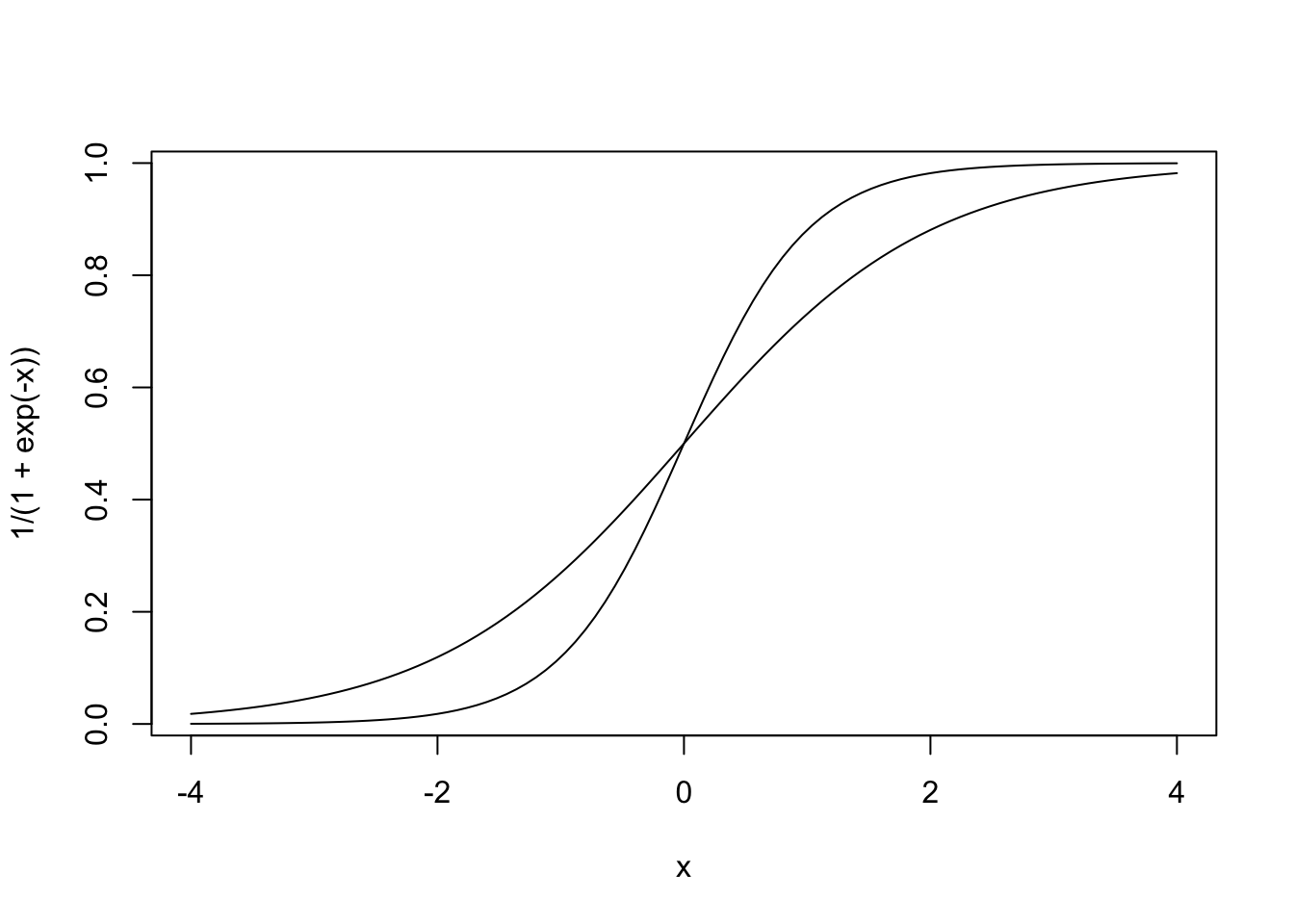
The curves are no longer parallel; they even cross. They typically don’t cross in applied settings, but they are always nonparallel.
The implication of this is the same as in the linear case. We cannot speak of “the” impact of S on Y, as it will not be the same at different levels of the X and C variables. So there is no direct analog of the no-interactions case for linear models, in which we could speak of \beta_2 as being “the” gender pay gap.
Some books motivate the logistic approach as the log-odds ratio, meaning in this example that the logarithm of the ratio (probability male) / (probability female) is linear in age and income.
log [probability male / probability female] = \beta_0 + \beta_1 A + \beta_2 W
So here we do have a formulation in which the impact of wage is the same for any age level. But this log scale is hard to interpret.
To be sure, we still choose whether or not to have product terms, of S with other predictors, by setting interactions to TRUE or FALSE, respectively. In the TRUE case, the interactions become even more complex.
This dataset and its documentation are included in dsld from the SortedEffects package. The issue here is whether racism played a role in mortgage denials in the Boston area. As this is a binary outcome, we might consider a logit model.
data(mortgageSE)
z <- dsldLogit(mortgageSE,'deny','black',yesYVal='1')
summary(z)
$`Summary Coefficients`
Covariate Estimate Standard.Error PValue
1 (Intercept) -4.68021873 0.73384720 1.798289e-10
2 p_irat 5.15585388 1.06258659 1.221161e-06
3 black1 0.64088712 0.18356747 4.806957e-04
4 hse_inc -0.83228276 1.28336021 5.166497e-01
5 loan_val 0.20205974 0.70171872 7.733852e-01
6 ccred2 0.72353389 0.21417086 7.293486e-04
7 ccred3 0.89094547 0.31542102 4.733628e-03
8 ccred4 1.56403348 0.33660382 3.375955e-06
9 ccred5 1.18009433 0.24808769 1.967220e-06
10 ccred6 1.55681669 0.23373704 2.728094e-11
11 mcred2 0.32167763 0.19927066 1.064678e-01
12 mcred3 0.45713207 0.47817345 3.390741e-01
13 mcred4 0.21616464 0.66923366 7.466928e-01
14 pubrec1 1.26756099 0.21044970 1.711007e-09
15 denpmi1 4.61566552 0.56425832 2.837083e-16
16 selfemp1 0.63445399 0.21665184 3.406571e-03
17 single1 0.41614600 0.15962315 9.132523e-03
18 hischl1 -1.11171191 0.42286015 8.562887e-03
19 probunmp 0.05565252 0.03459848 1.077202e-01
20 condo1 -0.12673301 0.17493093 4.687744e-01
21 ltv_med1 0.42773600 0.21618162 4.786155e-02
22 ltv_high1 1.50099888 0.42183272 3.732914e-04
$`Sensitive Factor Level Comparisons`
Factors Compared Estimates Standard Errors P-Value
1 1 - 0 0.6408871 0.1835675 0.0004806957So, being Black resulted in an average increase in log-odds of about 0.6409. A 95% confidence interval is 0.6409 \pm 1.96 x 0.1836 = (0.2810,1.0008). By comparison, being self-employed, for instance, has a similar estimated coefficient of about 0.6345. Again, interpretation on a log scale is difficult – imagine trying to convince a nontechnical person that logarithms of probabilities are meaningful – but at least it is interesting that being Black is a similar handicap to being self-employed; the latter trait means lack of a steady income, thus a possible risk to not repay the loan.
This is the dataset law.school.admissions, included in dsld via fairml. It’s quite well-known in the ML world, but its full provenance is unclear. For instance, the age variable skews far to middle-aged and older, seemingly not consistent with the data’s description on Kaggle.
Thus it should be kept in mind that this is just an illustration of methodology, and firm conclusions about the legal education process should not be drawn. The data concern students who were admitted to law school, so in spite of the title, it’s not about the admissions process itself.
The main variables of interest here are:
decile1, decile3: Student’s standing after Year 1 and Year 3 of law school.
fam_inc: Apparently the income level of the family in which the law students was raised in.
lsat: Score on the LSAT, a major law school admissions test.
ugpa: Undergraduate GPA.
gender: Gender.
race1: Primary racial group.
cluster: Level of prestige of the law school.
bar: After law school, did this person pass the bar examination?
Here’s what the data looks like:
data(law.school.admissions)
head(law.school.admissions)
age decile1 decile3 fam_inc lsat ugpa gender race1 cluster fulltime bar
2 62 10 10 5 44.0 3.5 female white 1 1 TRUE
3 62 5 4 4 29.0 3.5 female white 2 1 TRUE
6 61 8 7 3 37.0 3.4 male white 1 1 TRUE
7 60 8 7 4 43.0 3.3 female white 1 1 TRUE
9 57 3 2 4 41.0 3.3 female white 4 1 TRUE
11 59 1 1 4 24.5 2.2 male white 3 1 FALSEnames(law.school.admissions) [1] "age" "decile1" "decile3" "fam_inc" "lsat" "ugpa"
[7] "gender" "race1" "cluster" "fulltime" "bar" lsa <- law.school.admissionsThere has been concern that the LSAT and other similar tests are biased against Black and Latino students, and might otherwise have racial issues. Let’s investigate, using dsld.
z <- dsldLinear(lsa,'lsat','race1')
summary(z)
$`Summary Coefficients`
Covariate Estimate StandardError PValue
1 (Intercept) 31.98578856 0.448435264 0.000000e+00
2 age 0.02082458 0.005841758 3.641634e-04
3 decile1 0.12754812 0.020946536 1.134602e-09
4 decile3 0.21495015 0.020918737 0.000000e+00
5 fam_inc 0.30085804 0.035953051 0.000000e+00
6 ugpa -0.27817274 0.080430542 5.430993e-04
7 gendermale 0.51377385 0.060037102 0.000000e+00
8 race1black -4.74826307 0.198088318 0.000000e+00
9 race1hisp -2.00145969 0.203504412 0.000000e+00
10 race1other -0.86803104 0.262528590 9.449471e-04
11 race1white 1.24708760 0.154627086 6.661338e-16
12 cluster2 -5.10668358 0.119798362 0.000000e+00
13 cluster3 -2.43613709 0.074744210 0.000000e+00
14 cluster4 1.21094567 0.088478368 0.000000e+00
15 cluster5 3.79427535 0.124476695 0.000000e+00
16 cluster6 -5.53216090 0.210750853 0.000000e+00
17 fulltime2 -1.38882076 0.116212777 0.000000e+00
18 barTRUE 1.74973262 0.102818692 0.000000e+00
$`Sensitive Factor Level Comparisons`
Factors Compared Estimates Standard Errors P-Value
1 asian - black 4.748263 0.1980883 5.658131e-127
2 asian - hisp 2.001460 0.2035044 7.959167e-23
3 asian - other 0.868031 0.2625286 9.449471e-04
4 asian - white -1.247088 0.1546271 7.315779e-16
5 black - hisp -2.746803 0.1863750 3.672659e-49
6 black - other -3.880232 0.2515488 1.105293e-53
7 black - white -5.995351 0.1409991 0.000000e+00
8 hisp - other -1.133429 0.2562971 9.764506e-06
9 hisp - white -3.248547 0.1457509 4.792757e-110
10 other - white -2.115119 0.2194472 5.504309e-22There are very concerning racial differences here. Two very similar people—who attended the same quality law school, with the same undergraduate grades, the same law school grades, even having the same bar passage status—will have LSAT scores differing on average by almost 6 points if one person is Black and the other is white.
Again, one must be very cautious in drawing conclusions as to causes, not only because of the questionable quality of the dataset but also because hidden confounders may be at work here. For instance, though we have data on undergraduate GPA, we don’t know the quality of the undergraduate institution. Equally important, we are looking only at those who were admitted to law school; there may be a different pattern in the general population. But the results here raise serious concerns.
What about passage of the bar exam? Does race play a role?
comparisonPts <- lsa[c(2,22,222,2222),-c(8,11)]
w <- dsldLogit(lsa,'bar','race1',comparisonPts,yesYVal= 'TRUE')
summary(w)
$`Summary Coefficients`
Covariate Estimate Standard.Error PValue
1 (Intercept) -6.24270431 0.401137499 1.308749e-54
2 age 0.03422736 0.004412075 8.651327e-15
3 decile1 0.04757930 0.018427921 9.825421e-03
4 decile3 0.48948790 0.020478831 2.909741e-126
5 fam_inc -0.02199998 0.030373942 4.688788e-01
6 lsat 0.08539196 0.005869773 6.036082e-48
7 ugpa 0.35866792 0.068480789 1.627690e-07
8 gendermale 0.15784971 0.052981691 2.888835e-03
9 race1black 0.20964666 0.130530665 1.082497e-01
10 race1hisp 0.07078955 0.136700672 6.045675e-01
11 race1other 0.06268978 0.185086652 7.348320e-01
12 race1white 0.37434379 0.111291746 7.692575e-04
13 cluster2 -0.85200531 0.096842597 1.394793e-18
14 cluster3 -0.15391198 0.069754152 2.734957e-02
15 cluster4 -0.23351498 0.082896615 4.848324e-03
16 cluster5 0.25793171 0.142650370 7.058485e-02
17 cluster6 -1.33844995 0.145701743 4.068449e-20
18 fulltime2 -0.54114731 0.088416220 9.330973e-10
$`Sensitive Factor Level Comparisons`
Factors Compared Estimates Standard Errors P-Value
1 asian - black -0.209646661 0.13053067 0.1082496509
2 asian - hisp -0.070789554 0.13670067 0.6045674668
3 asian - other -0.062689778 0.18508665 0.7348319612
4 asian - white -0.374343793 0.11129175 0.0007692575
5 black - hisp 0.138857107 0.11256856 0.2173767489
6 black - other 0.146956884 0.16926160 0.3852720334
7 black - white -0.164697131 0.09362748 0.0785659049
8 hisp - other 0.008099776 0.17545132 0.9631784378
9 hisp - white -0.303554239 0.09885125 0.0021347294
10 other - white -0.311654015 0.15832839 0.0490217329sapply(c('black','white'), function(r) {
newData <- comparisonPts
newData$race1 <- r
predict(w,newData)$prediction
}) black white
[1,] 0.7458474 0.7757873
[2,] 0.7405560 0.7709278
[3,] 0.9912332 0.9925545
[4,] 0.9653157 0.9704267That’s a lot of output. Let’s take a closer look.
At least judging from these predicted probabilities, Black and white students having the same traits appear to have passed the bar exam at about the same rates.
We might also do a little check of the appropriateness of the logistic model for this data. One rough approach might be to use dsldConditDisparity(), as we did in the linear case:
# Y needs to be numeric, in this case 0,1
lsab <- lsa
lsab$bar <- ifelse(lsab$bar=='TRUE',1,0)
dsldConditDisparity(lsab,'bar','race1','lsat','lsab$age > 0')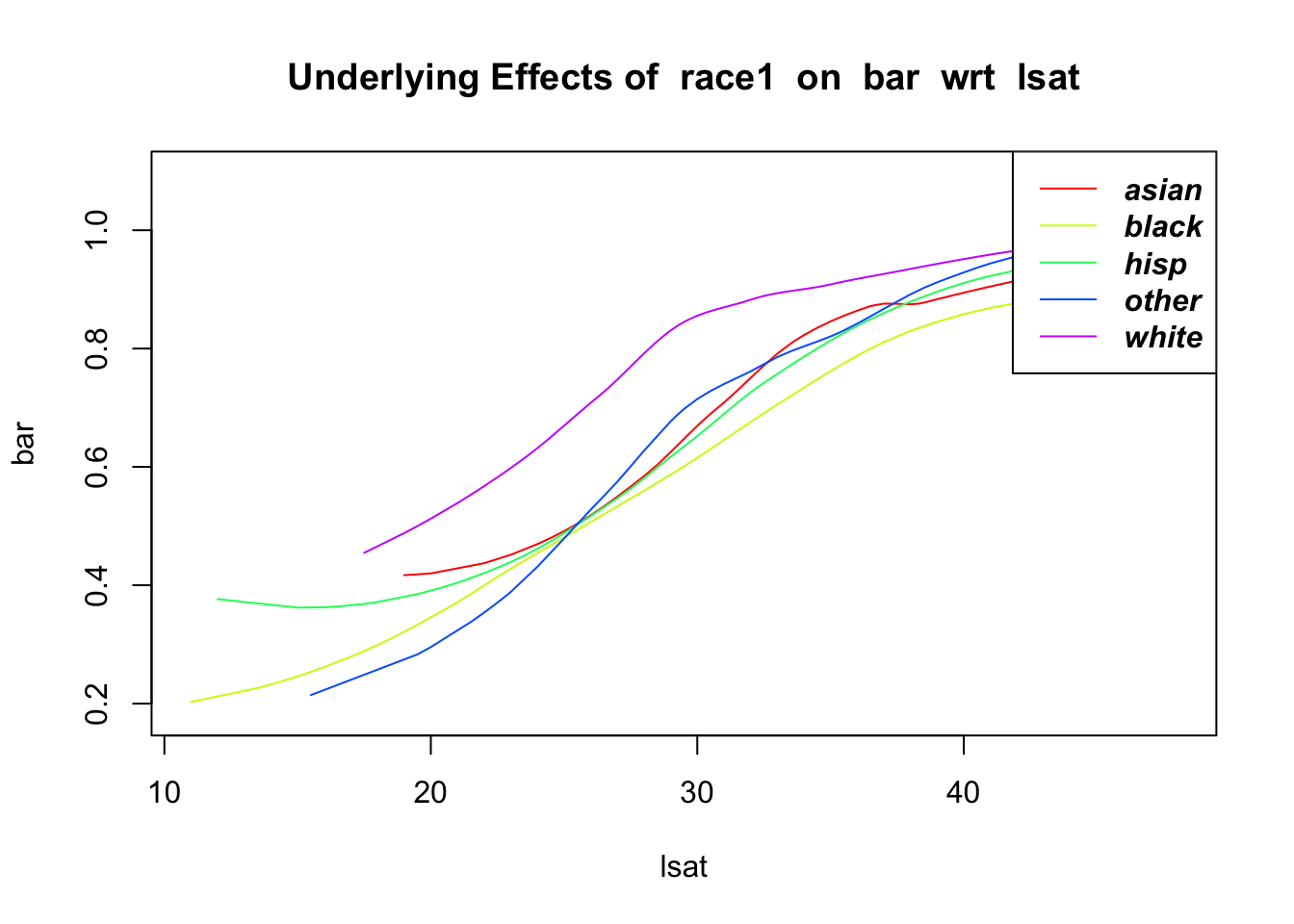
Looks pretty good, generally logit-shaped.
In 2016, the American Statistical Association released its first-ever position paper, to warn of the problems of significance testing and “p-values.” Though the issues had been well known for years—some journals had even banned the use of p-values in their published research papers—it was “significant” that the ASA finally took a stand. Let’s use the law school example in Section 2.4 to illustrate.
There is concern that the LSAT and other similar tests may be heavily influenced by family income, thus unfair, especially to underrepresented minorities. To investigate this, let’s consider the bi, the estimated coefficients in our linear model for the LSAT above.
In particular, look at the coefficient for family income, 0.3009. The p-value is essentially 0, which in an academic research journal would classically be heralded with much fanfare, termed “very highly significant,” with a 3-star insignia. Indeed, the latter is seen in the output above. (This comes from R, not dsld.) But actually, the impact of family income is not very large. Here’s why:
Family income in this dataset is measured by quintiles. So this estimated coefficient says that, for example, if we compare people who grew up in the bottom 20% of income with those who were raised in the next 20%, the mean LSAT score rises by only about 1/3 of 1 point—a minuscule difference on a test where scores are typically in the 20s, 30s and 40s. The 95% confidence interval (CI), (0.2304,0.3714), again indicates that the effect size here is very small.
So family income is not an important factor after all, and the significance test was highly misleading.
Some who read this may object, “Sure, there sometimes may be a difference between statistical significance and practical significance. But I just want to check whether my model fits the data.” Actually, it’s the same problem.
For instance, suppose we are considering adding an interaction term between race and undergraduate GPA to our above model. Let’s fit two models, one without interactions and one with, and do a prediction from each. For simplicity, let’s use R’s linear model function, lm(), directly:
w <- lm(lsat ~ .,lsa)  # predict lsat from all other variables
w1 <- lm(lsat ~ .+race1:ugpa,lsa)  # add interaction
summary(w1)
Call:
lm(formula = lsat ~ . + race1:ugpa, data = lsa)

Residuals:
     Min       1Q   Median       3Q      Max
-19.1783  -2.8065   0.1219   2.8879  16.0633

Coefficients:
                 Estimate Std. Error t value Pr(>|t|)
(Intercept)     26.574993   1.219611  21.790  < 2e-16 ***
age              0.020612   0.005837   3.531 0.000415 ***
decile1          0.127585   0.020926   6.097 1.10e-09 ***
decile3          0.213918   0.020902  10.234  < 2e-16 ***
fam_inc          0.295042   0.035939   8.210 2.35e-16 ***
ugpa             1.417659   0.363389   3.901 9.60e-05 ***
gendermale       0.513686   0.059986   8.563  < 2e-16 ***
race1black       4.121631   1.439354   2.864 0.004194 **
race1hisp        1.378504   1.570833   0.878 0.380191
race1other       2.212299   1.976702   1.119 0.263073
race1white       6.838251   1.201559   5.691 1.28e-08 ***
cluster2        -5.105703   0.119879 -42.590  < 2e-16 ***
cluster3        -2.427800   0.074862 -32.430  < 2e-16 ***
cluster4         1.208794   0.088453  13.666  < 2e-16 ***
cluster5         3.777611   0.124422  30.361  < 2e-16 ***
cluster6        -5.565130   0.210945 -26.382  < 2e-16 ***
fulltime2       -1.406151   0.116132 -12.108  < 2e-16 ***
barTRUE          1.743800   0.102855  16.954  < 2e-16 ***
ugpa:race1black -2.876555   0.460281  -6.250 4.20e-10 ***
ugpa:race1hisp  -1.022786   0.494210  -2.070 0.038508 *
ugpa:race1other -0.941852   0.617940  -1.524 0.127479
ugpa:race1white -1.737553   0.370283  -4.693 2.72e-06 ***
---
Signif. codes:  0 '***' 0.001 '**' 0.01 '*' 0.05 '.' 0.1 ' ' 1

Residual standard error: 4.193 on 20778 degrees of freedom
Multiple R-squared:  0.3948,    Adjusted R-squared:  0.3942
F-statistic: 645.4 on 21 and 20778 DF,  p-value: < 2.2e-16
typx <- lsa[1,-5] # set up an example case
predict(w,typx) # estimated regression function value 2
40.2294 predict(w1,typx) # estimated regression function value 2
40.2056 Indeed, the Black and white interaction terms are “significant,” even “very highly significant.” But does that mean we should use the more complex model?
Recall that many machine learning algorithms, including standard linear regression, use the estimated regression function value as its predicted value. So we see here that adding in an interaction term changed the estimated value of the regression function by only about 0.02 out of a 40.23 baseline. So, we may well prefer the simpler, no-interaction model.
Again, we must not take small p-values literally.
The central issue in the above examples, and essentially in any other testing situation, is that the test is not answering the question of interest to us.
We wish to know whether family income plays a substantial role in the LSAT, not whether there is any relation at all, no matter how meaningless. Similarly, we wish to know whether the interaction between race and GPA is substantial enough to include it in our model, not whether there is any interaction at all, no matter how tiny.
The question at hand in research studies is rarely, if ever, whether a quantity is exactly 0, i.e. 0.000… to infinitely many decimal places. Indeed, in most cases our measuring instrument is not this accurate in the first place, and there will always be systemic bias or missingness, unobserved variables and so on, so exact zeroness is not even a meaningful concept.
Thus in almost all cases, significance tests don’t address the issue of interest, which is whether some population quantity is substantial enough to be considered important. Analysts should not be misled by words like “significant.” As noted, modern statistical practice places reduced value, or in the view of many, no value at all, on significance testing.
To be sure, not all statistical professionals are “modern.” Some on the ASA committee that produced the position paper were more reserved on the matter, resulting in the paper not going further than some would have preferred. Nor is modernness necessarily a virtue.
But readers of this book are urged to always keep in mind the two examples above—family income and an interaction term each having minuscule impact even though the tests declared them “significant”—in conducting future analyses, or assessing the analysis of others.
Instead, form a confidence interval for the quantity of interest. Do not just note whether the CI contains 0. Where is the CI’s center? How wide is it, relative to the accuracy you wish to have? Then make your decision regarding importance of the effect on the basis of the overall situation, not by mechanically performing a test.
Recall that COMPAS is a tool developed to help judges decide on sentences in criminal trials, which it does by predicting whether the defendant is likely to recidivate. As noted earlier, one study found the tool to be biased against African-Americans; the creator of the tool, Northpointe, disagreed.
Let’s investigate this, by predicting Y = the COMPAS score, with S = race and C = the remaining variables. Does S have much effect on Y?
data(compas1)
w <- dsldLinear(compas1,'decile_score','race')
summary(w)
$`Summary Coefficients`
Covariate Estimate StandardError PValue
1 (Intercept) 12.46413291 1.452859168 0.000000e+00
2 age -0.09404721 0.002497211 0.000000e+00
3 juv_fel_count 0.39479964 0.073934975 9.303767e-08
4 juv_misd_count 0.16212898 0.061011256 7.875488e-03
5 juv_other_count 0.29435177 0.060546864 1.164686e-06
6 priors_count 0.22714719 0.006509637 0.000000e+00
7 sexMale -0.13540331 0.069213068 5.042679e-02
8 two_year_recidYes 0.82273099 0.062559111 0.000000e+00
9 raceAsian -0.68595234 0.393500071 8.129735e-02
10 raceCaucasian -0.46795096 0.062339397 6.061818e-14
11 raceHispanic -0.93831638 0.101286306 0.000000e+00
12 raceNative American 0.38640654 0.554347886 4.857734e-01
13 raceOther -1.30753368 0.123716368 0.000000e+00
14 c_jail_in -69.51719068 9.027235193 1.354472e-14
15 c_jail_out 70.72627748 7.301645508 0.000000e+00
16 c_offense_date -4.21691395 1.326098890 1.473059e-03
17 screening_date -7.75559525 5.422330875 1.526291e-01
18 in_custody -6.31642337 2.419684027 9.042765e-03
19 out_custody 9.97020948 1.951867970 3.255267e-07
$`Sensitive Factor Level Comparisons`
Factors Compared Estimates Standard Errors P-Value
1 African-American - Asian 0.6859523 0.3935001 8.129735e-02
2 African-American - Caucasian 0.4679510 0.0623394 6.072710e-14
3 African-American - Hispanic 0.9383164 0.1012863 1.969130e-20
4 African-American - Native American -0.3864065 0.5543479 4.857734e-01
5 African-American - Other 1.3075337 0.1237164 4.157758e-26
6 Asian - Caucasian -0.2180014 0.3935940 5.796653e-01
7 Asian - Hispanic 0.2523640 0.4015448 5.296877e-01
8 Asian - Native American -1.0723589 0.6779716 1.137143e-01
9 Asian - Other 0.6215813 0.4077123 1.273692e-01
10 Caucasian - Hispanic 0.4703654 0.1033446 5.328378e-06
11 Caucasian - Native American -0.8543575 0.5555712 1.240975e-01
12 Caucasian - Other 0.8395827 0.1253271 2.096615e-11
13 Hispanic - Native American -1.3247229 0.5612839 1.826678e-02
14 Hispanic - Other 0.3692173 0.1485386 1.293095e-02
15 Native American - Other 1.6939402 0.5659026 2.759400e-03Y, the decile score, is the risk of recidivism; the larger the value of Y, the greater the risk.
A 95% confidence interval for the mean difference between Black and Caucasian risk scores, holding age, juvenile felony count and so on constant, is 0.4680 \pm 1.96 x 0.0623 = (0.3459,0.5902). Since the risk of recidivism is given in deciles, the value is 1,2,…,10, and we see that the tool does indeed appear to be biased against Black defendants. Though the effect is rather small, at most 0.6 of a decile point,
and as usual, one must keep in mind the possibility of unseen confounders, it is still a matter of serious concern. Note that the estimated effect of being Black, 0.4680, is actually larger than the estimated effect of having one additional juvenile felony count, 0.3948.
One may have specific confounders in mind for a particular analysis, but it is often unclear as to which to use, or for that matter, why not use them all? This section addresses those issues.
We will address that second question first: Why not use all our variables, other than Y and S, as confounders? We will see that if we have a large number of variables, there is good reason to select only a subset of potential confounders.
How might we do so? We will first recommend some graphical and tabular methods aimed at preliminary exploration toward this end, and then present a dsld function that users may find useful for more systematic selection of confounders.
The German credit dataset, included in the fairml package and thus with dsld, consists of a total of 21 variables:
data(german.credit)
names(german.credit)
[1] "Account_status" "Duration"
[3] "Credit_history" "Purpose"
[5] "Credit_amount" "Savings_bonds"
[7] "Present_employment_since" "Installment_rate"
[9] "Other_debtors_guarantors" "Resident_since"
[11] "Property" "Age"
[13] "Other_installment_plans" "Housing"
[15] "Existing_credits" "Job"
[17] "People_maintenance_for" "Telephone"
[19] "Foreign_worker" "Credit_risk"
[21] "Gender" Excluding Y = credit risk and S = gender, that gives us 19 variables to choose among for our confounders. Which ones should we use?
Technically, almost any variable is a confounder. The impact may be quite minuscule, but through a long chain of relations among many variables, there will usually be at least some connection, though again possibly very faint.
Well, then, why not use them all? That is what we’ve done in our earlier examples. But there are several issues to consider not using the full set of variables, i.e. every variable other than Y and S:
It may cause overfitting, resulting in large standard errors.
It is unwieldy, difficult to interpret. Many treatments of these issues speak of a desire for a “parsimonious” model.
There is a concern regarding partial duplication. It may be that, say, some pair of confounders suffices, with the rest being highly correlated with this pair. Then adding further confounders does nothing to further clarify discrimination effects.
Concerning this last point: We do not merely have 19 choices for confounders; we must choose from the set of all possible groups of confounders: singletons, pairs, triplets and so on. There are 2^{19} possibilities here, about half a million.
Our specific purpose here is to find a reasonable set of confounders. In essence, that means find variables C such that C is substantially correlated with both Y and S. One way to approach that is to do separate predictions of Y and S, and see which features turn out to predict both well.
One useful tool here is the function dsldFrequencyByS(), which aims to analyze categorical (not numeric) columns by printing out a list of frequencies. Since education level in the svcensus data is categorical, we can call the function as follows:
library(dsld)
data(svcensus)
dsldFrequencyByS(svcensus, "educ", "gender")
Frequency of 14 Frequency of 16 Frequency of zzzOther
female 0.2068052 0.02098615 0.7722086
male 0.2177579 0.04110130 0.7411408About 21% of the women had a Master’s degree, with a figure of 22% for men, and so on. The similar frequency values between men and women suggests not using education as a confounder.
On the other hand, we do see more interesting results if we look at occupation instead of education:
library(dsld)
data(svcensus)
dsldFrequencyByS(svcensus, "occ", "gender")
Frequency of 100 Frequency of 101 Frequency of 102 Frequency of 106
female 0.3117359 0.2349226 0.3274246 0.04258354
male 0.2016862 0.2203267 0.3433671 0.01923330
Frequency of 140 Frequency of 141
female 0.02587612 0.05745721
male 0.04446055 0.17092610Notice for instance the difference between the proportion of males in occupation 141 versus females in that same occupation–a difference of approximately 11 percentage points. The difference in frequencies here is much greater than with the education example, which suggests using occupation as a confounder. Since different occupations correlate with different wages, it is possible that this gender difference in occupations proportions could be affecting the perceived relationship between gender and wage. We should definitely consider using occupation as a confounder.
Suppose we are investigating the relationships among the variables LSAT score, GPA and race. One way to visualize these relationships would be through dsldScatterPlot3D:
data(law.school.admissions)
dsldScatterPlot3D(law.school.admissions,
   c('lsat','fam_inc','ugpa'), 'race1', pointSize = 4)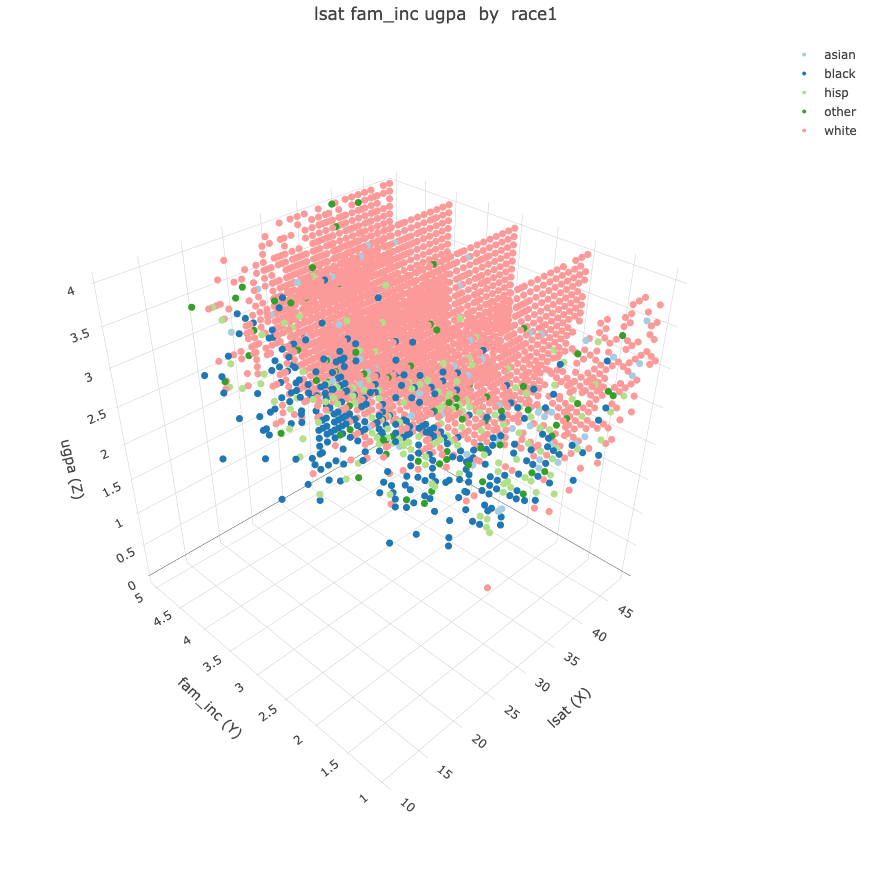
Of course, visualizing a 3-dimensional scatter plot is more challenging than viewing the ordinary 2-dimensional kind. But it does enable richer search for relationships. Here are a few trends suggested by the plot:
On the fam_inc axis, the lowest quintile of family income is mostly populated by Black and Latino students, while the upper two levels are almost entirely made up of white students.
On the lsat axis, most of those with a lower score happen to be non-white, across all income levels.
The ugpa axis has a similar trend to that of the lsat axis, albeit to a much weaker extent.
Once again, this analysis is merely exploratory, but the graph lends some credence to our earlier analysis that family income may confound the relationship between race and LSAT score. Indeed, if we wish to present the earlier analysis, say in a meeting, the graph would make for a nice visual illustration.
Note however, that these graphs do not do much to answer the question of whether, in this case, that relationship is substantial. The formal analysis we did earlier indicates that it is not.
Returning to the question of whether race has a substantial impact on exam results, we can look at the density plot of LSAT scores for different races.
data(law.school.admissions)
dsldDensityByS(law.school.admissions, cName = "lsat", sName = "race1")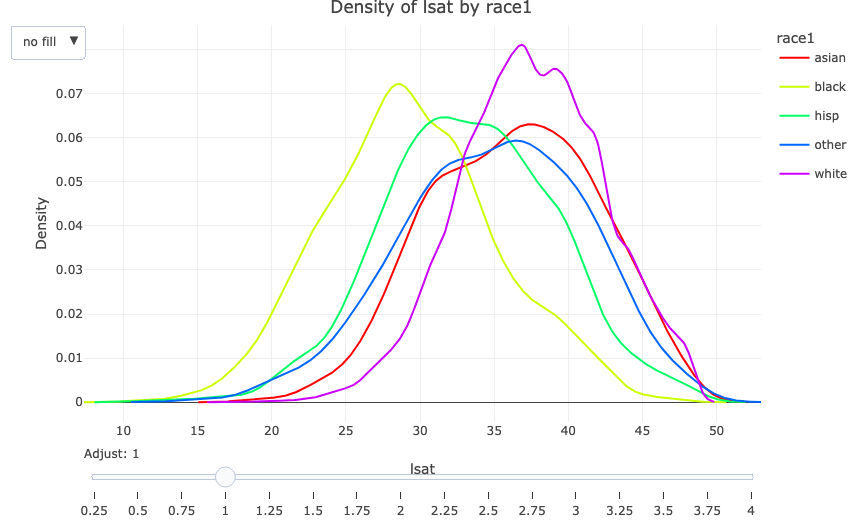
Each curve represents the distribution of LSAT scores for one race. The graph suggests the possibility of racial bias in the LSAT. But again, this bias may be confounded.
This suggests that family income could be confounding the potential relationship between race and LSAT scores. But, as noted, our earlier analysis indicated that the degree of this relationship is very small.
Once one accounts for links of two variables, then links of links and so on, virtually everything in practice is a confounder to some degree, so it is up to the analyst to decide when a feature is confounding enough to be considered for inclusion in a model.
The above graphical and tabular approaches may suffice to determine one’s confounders in some applications. We now present more formal, systematic methods.
Many, many approaches to this variable selection or feature selection problem have been proposed over the years. The qeML package includes five of them (see the documentation), and there are myriad others.
One widely-used method is permutation, which we will use here. To gauge the importance of a variable V in the context of using some ML algorithm, we do two runs through the data, first with the original dataset, and then with the V column changed through a random shuffling of the values in that column. This may seem counterproductive at first, but the point is that if the variable in question really is important, our predictive accuracy should be compromised in that second run. The importance measure is then taken to be the proportional increase in error rate. The larger the increase, the more important we deem the variable to have.
This function serves as an aid to selecting confounders, using the permutation-based computation in the randomForest package.
Its operation is best described by example, which we will present next. Before reading it, though, recall that we are interested in finding variables that are correlated with, i.e. predict well, both Y and S.
Here is an example, using the mortgage data.
data(mortgageSE)
dsldCHunting(mortgageSE,'deny','black')
Loading required namespace: randomForest$impForY
p_irat denpmi loan_val hse_inc ltv_med ccred
1.572407e-02 1.521850e-02 1.424102e-02 1.261053e-02 9.573815e-03 1.816735e-03
condo single ltv_high mcred pubrec selfemp
1.616972e-03 1.382515e-03 1.214264e-03 9.980507e-04 7.627012e-04 5.752325e-04
probunmp hischl
4.358516e-04 6.657360e-06
$impForS
p_irat loan_val ltv_med hse_inc condo
0.0111311292 0.0084947517 0.0068211400 0.0065548724 0.0049230331
single ccred selfemp denpmi ltv_high
0.0028915111 0.0011021787 0.0006796755 0.0004335111 0.0004057896
pubrec hischl probunmp mcred
0.0003817886 0.0001854028 -0.0003391166 -0.0005746735
$inCommon
$inCommon[[1]]
[1] "p_irat"
$inCommon[[2]]
[1] "p_irat"
$inCommon[[3]]
[1] "p_irat" "loan_val"
$inCommon[[4]]
[1] "p_irat" "loan_val" "hse_inc"
$inCommon[[5]]
[1] "p_irat" "loan_val" "hse_inc" "ltv_med"
$inCommon[[6]]
[1] "p_irat" "loan_val" "hse_inc" "ltv_med"
$inCommon[[7]]
[1] "p_irat" "loan_val" "hse_inc" "ltv_med" "ccred" "condo"
$inCommon[[8]]
[1] "p_irat" "loan_val" "hse_inc" "ltv_med" "ccred" "condo" "single"
$inCommon[[9]]
[1] "p_irat" "denpmi" "loan_val" "hse_inc" "ltv_med" "ccred" "condo"
[8] "single"
$inCommon[[10]]
[1] "p_irat" "denpmi" "loan_val" "hse_inc" "ltv_med" "ccred" "condo"
[8] "single" "ltv_high"The importance measures are printed out (the ranking is what matters), followed by the “top-i” sets in common.
For instance, the single variables (excluding S) that predict Y well are first p_irat, then denpmi and so on. In predicting S, excluding Y, the best are p_irat, then loan_val et cetera.
Since we are focusing on variables that are correlated with both Y and S, we take the intersection. For example, the intersection of the top three Y predictors and top three S predictors is p_irat and loan_val. We may wish to use these as our confounders.
As usual, there are no magic formulas to use here. The analyst is given a choice. One might use just the top two confounders, or the top three and so on.
In the paper “Are Emily and Greg More Employable Than Lakisha and Jamal? A Field Experiment on Labor Market Discrimination” (Am. Econ. Rev., Sept. 2004), researchers “tested” employers by sending CVs with “white-sounding” and “Black-sounding” names, checking for bias. Did employers call “whites” more often than “Blacks” for an interview? The resulting data is lak in dsld.
data(lak)
dim(lak)  # number of rows and columns
[1] 447 63names(lak) [1] "education" "ofjobs" "yearsexp"
[4] "honors" "volunteer" "military"
[7] "empholes" "occupspecific" "occupbroad"
[10] "workinschool" "email" "computerskills"
[13] "specialskills" "firstname" "sex"
[16] "race" "h" "l"
[19] "call" "city" "kind"
[22] "adid" "fracblack" "fracwhite"
[25] "lmedhhinc" "fracdropout" "fraccolp"
[28] "linc" "col" "expminreq"
[31] "schoolreq" "eoe" "parent_sales"
[34] "parent_emp" "branch_sales" "branch_emp"
[37] "fed" "fracblack_empzip" "fracwhite_empzip"
[40] "lmedhhinc_empzip" "fracdropout_empzip" "fraccolp_empzip"
[43] "linc_empzip" "manager" "supervisor"
[46] "secretary" "offsupport" "salesrep"
[49] "retailsales" "req" "expreq"
[52] "comreq" "educreq" "compreq"
[55] "orgreq" "manuf" "transcom"
[58] "bankreal" "trade" "busservice"
[61] "othservice" "missind" "ownership" We’ll take Y to be call, which records whether the “applicant” received a call back in response to submitting the CV. S will be race, which now leaves us with 63 - 2 = 61 potential confounders!
Actually, it’s even worse. Many rows of the dataset contain missing values (coded NA in R). The version here uses only intact rows, of which there are 447. (The original data had 4870 rows.) A rough rule of thumb commonly cited in statistics is that in regression estimation, the number of features should be less than the square root of the number of data points; by this or almost any other measure, 61 predictors is well beyond the capacity of 447 data points. And, as noted, that number of variables is unwieldy. Let’s see what we can do to reduce that.
dsldCHunting(lak,'call','race',25)$impForY
fraccolp_empzip linc_empzip fracblack_empzip fracdropout_empzip
5.036826e-03 4.387906e-03 3.920206e-03 2.840339e-03
lmedhhinc_empzip fraccolp parent_emp branch_emp
2.364426e-03 1.882145e-03 1.685122e-03 1.632983e-03
manager parent_sales adid fracwhite_empzip
1.546209e-03 1.465513e-03 1.365951e-03 1.298180e-03
compreq branch_sales linc specialskills
1.183046e-03 1.089764e-03 9.985455e-04 8.094716e-04
yearsexp expminreq city education
8.042824e-04 6.261676e-04 5.094726e-04 4.918367e-04
firstname fracblack lmedhhinc fracwhite
4.422402e-04 3.743261e-04 3.606234e-04 3.492749e-04
req col sex busservice
3.270251e-04 3.056382e-04 2.958095e-04 2.937390e-04
kind schoolreq occupspecific secretary
2.846074e-04 2.804530e-04 2.683358e-04 2.370540e-04
fracdropout ownership educreq offsupport
2.261185e-04 1.919390e-04 1.293761e-04 9.942245e-05
othservice empholes h eoe
8.136900e-05 6.956975e-05 5.352227e-05 5.128453e-05
workinschool comreq salesrep fed
4.654559e-05 2.768526e-05 2.753535e-05 1.646919e-05
expreq occupbroad transcom missind
1.563089e-05 1.057679e-05 0.000000e+00 0.000000e+00
l supervisor bankreal trade
-3.223782e-06 -1.400369e-05 -1.481481e-05 -2.458631e-05
ofjobs retailsales volunteer honors
-2.692058e-05 -2.964084e-05 -4.660129e-05 -6.930425e-05
orgreq military email manuf
-7.272680e-05 -1.016905e-04 -1.414878e-04 -1.618759e-04
computerskills
-1.879919e-04
$impForS
firstname linc lmedhhinc fracwhite
6.961672e-02 4.043932e-03 3.989586e-03 3.517392e-03
fracdropout fraccolp fracblack military
1.469569e-03 1.345016e-03 1.229633e-03 9.768454e-04
occupspecific eoe workinschool honors
9.468070e-04 5.058969e-04 3.792476e-04 3.346304e-04
manuf sex manager kind
1.869096e-04 1.225599e-04 5.640457e-05 3.750371e-05
education missind transcom comreq
2.274675e-05 0.000000e+00 -2.365519e-05 -1.259363e-04
compreq fracdropout_empzip supervisor offsupport
-1.646967e-04 -1.912347e-04 -2.339711e-04 -2.343896e-04
h bankreal secretary busservice
-2.761806e-04 -3.214700e-04 -3.530520e-04 -3.545812e-04
fed city othservice req
-3.637368e-04 -3.725929e-04 -3.751033e-04 -4.061864e-04
col salesrep retailsales empholes
-4.563370e-04 -4.816404e-04 -5.112028e-04 -5.311767e-04
lmedhhinc_empzip schoolreq specialskills expreq
-5.715478e-04 -5.932449e-04 -6.047124e-04 -6.957926e-04
educreq orgreq volunteer computerskills
-7.004206e-04 -7.205996e-04 -7.914296e-04 -8.124626e-04
trade ownership l ofjobs
-9.436668e-04 -9.529334e-04 -1.017172e-03 -1.025425e-03
email expminreq occupbroad branch_emp
-1.027732e-03 -1.287969e-03 -1.822120e-03 -2.050827e-03
fraccolp_empzip parent_sales fracblack_empzip branch_sales
-2.074625e-03 -2.458617e-03 -2.603289e-03 -2.634436e-03
fracwhite_empzip yearsexp linc_empzip adid
-3.159820e-03 -3.167127e-03 -3.290315e-03 -4.956294e-03
parent_emp
-5.122121e-03
$inCommon
$inCommon[[1]]
character(0)
$inCommon[[2]]
character(0)
$inCommon[[3]]
character(0)
$inCommon[[4]]
character(0)
$inCommon[[5]]
character(0)
$inCommon[[6]]
[1] "fraccolp"
$inCommon[[7]]
[1] "fraccolp"
$inCommon[[8]]
[1] "fraccolp"
$inCommon[[9]]
[1] "fraccolp"
$inCommon[[10]]
[1] "fraccolp"
$inCommon[[11]]
[1] "fraccolp"
$inCommon[[12]]
[1] "fraccolp"
$inCommon[[13]]
[1] "fraccolp"
$inCommon[[14]]
[1] "fraccolp"
$inCommon[[15]]
[1] "fraccolp" "manager" "linc"
$inCommon[[16]]
[1] "fraccolp" "manager" "linc"
$inCommon[[17]]
[1] "fraccolp" "manager" "linc"
$inCommon[[18]]
[1] "fraccolp" "manager" "linc"
$inCommon[[19]]
[1] "fraccolp" "manager" "linc"
$inCommon[[20]]
[1] "fraccolp" "manager" "linc" "education"
$inCommon[[21]]
[1] "fraccolp" "manager" "compreq" "linc" "education" "firstname"
$inCommon[[22]]
[1] "fracdropout_empzip" "fraccolp" "manager"
[4] "compreq" "linc" "education"
[7] "firstname" "fracblack"
$inCommon[[23]]
[1] "fracdropout_empzip" "fraccolp" "manager"
[4] "compreq" "linc" "education"
[7] "firstname" "fracblack" "lmedhhinc"
$inCommon[[24]]
[1] "fracdropout_empzip" "fraccolp" "manager"
[4] "compreq" "linc" "education"
[7] "firstname" "fracblack" "lmedhhinc"
[10] "fracwhite"
$inCommon[[25]]
[1] "fracdropout_empzip" "fraccolp" "manager"
[4] "compreq" "linc" "education"
[7] "firstname" "fracblack" "lmedhhinc"
[10] "fracwhite" We are seeking variables that are correlated both with Y and S, yet there appear to be many that correlate with just one of these. That’s to be expected for datasets having a large number of variables. But still, in the end we see a few that meet our goals.
An observational study is, in essence, one that is not planned. For instance, say we are comparing an old and a new drug for hypertension. Suppose that, unknown to us, the new medication does well on younger patients but not on older ones. Say the nature of the data collection process results in disproportionately sampling older patients, but our data itself does not include patient ages. This could unfairly make the new drug appear ineffective. So age would be a confounder, but alas, an unobserved one.
In a randomized clinical trial (RCT), we would randomly assign treatments to patients, so there would likely be no strong imbalance in age distribution in the two drug groups. Thus, even if our data still did not record patient age, there would be no age bias in our analysis. But in most cases in practice, RCTs are infeasible or impossible; we cannot “assign” race, for instance.
Trying to guess important variables that we do not have is difficult, of course. It depends crucially on domain expertise, and then dealing with it statistically is difficult if not impossible. Nevertheless, the analyst must always keep this issue in mind.
Causal analysis (CA) takes on many forms, and indeed, there is no good definition of what it entails. Moreover, it tends to be controversial. Our discussion here will focus on two topics:
covariate matching methods
directed acyclic graphs (DAGs)
The basic idea here is quite simple. Consider our above example comparing two medications, A and B, with Y being the response variable. Instead of comparing the two sample means of Y, we form pairs of data points, with an A group and B group member in each pair. These pairs form our new data. (Not every one of the original data points will necessarily now be represented, though some may appear more than once.) We then compare mean Y values among the two groups in this new data.
Here is an example, involving a jobs training program:
set.seed(9999)  # matching breaks ties at random
data(lalonde,package='Matching')
ll <- lalonde
ll$treat <- as.factor(ll$treat)
ll$re74 <- NULL
ll$re75 <- NULL
matched <- dsldMatchedATE(ll,'re78','treat','1')
summary(matched)
Estimate...  1467.8
SE.........  453.46
T-stat.....  3.2368
p.val......  0.0012088

Original number of observations..............  445
Original number of treated obs...............  185
Matched number of observations...............  445
Matched number of observations  (unweighted).  445
The data structure is
  age educ black hisp married nodegr     re78 u74 u75 treat
1  37   11     1    0       1      1  9930.05   1   1     1
2  22    9     0    1       0      1  3595.89   1   1     1
3  30   12     1    0       0      0 24909.50   1   1     1
4  27   11     1    0       0      1  7506.15   1   1     1
5  33    8     1    0       0      1   289.79   1   1     1
6  22    9     1    0       0      1  4056.49   1   1     1
...
Participants in the program had treat coded 1, the others 0. Income several years later (1978) is shown in re78. In the matched pairs, the average difference in income was estimated to be 1467.8. The seed fixes the random tie-breaking in matching.
A key point is the manner in which the matching is done. In most cases, it can be done only approximately. In the medication example, for instance, we probably could not find two patients of the same age and the same gender and the same race and so on. But the more variables we have, the harder it is to find even approximate matches. One solution is to use propensity scores, not covered here.
An even larger problem is interpretation. Let X denote the vector of our predictors, e.g. age, gender and so on. The regression methods covered earlier in this book estimate the conditional mean Y for a given X, whereas matching methods estimate the unconditional mean of Y. The interpretation of the latter may be problematic, since our matching process itself may have changed the distribution of X. (By the way, changing the distribution of X does not change the conditional mean of Y given X, as long as the change doesn’t affect Y.)
We then compute mean Y in both groups.
In a DAG, an arrow from A to B signifies that A “causes” B.
For instance, a graphical description of a situation in which older people (say who came of age before anti-smoking campaigns) might be more likely to smoke, and for other reasons may be more likely to develop cancer even if they are nonsmokers. A graphical description would be
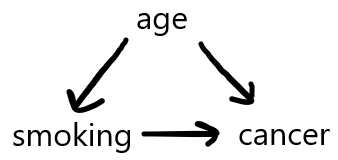
DAGS are usually just writeups of one’s “gut feelings” as to what causes what. They cannot be derived from our data. More on this below, but under very stringent assumptions, we can attempt to form a DAG from the data. Here is an example of that, using a function in the bnlearn package, for which a dsld wrapper is available:
data(svcensus)
# iamb does not accept integer data
svcensus$wkswrkd <- as.numeric(svcensus$wkswrkd)
svcensus$wageinc <- as.numeric(svcensus$wageinc)
iambOut <- dsldIamb(svcensus)
plot(iambOut)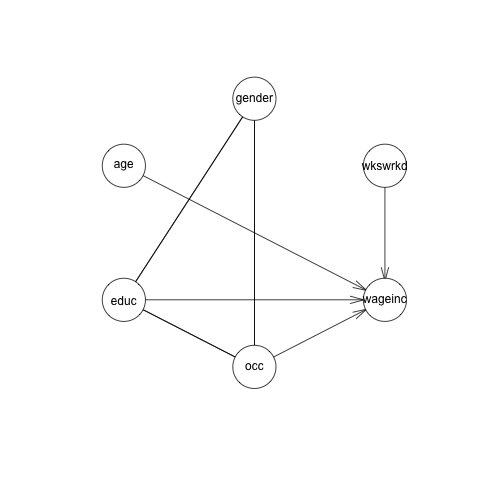
There are a couple of undirected arcs, e.g. between gender and occupation – found to be relations, but with indeterminate direction, using available data.
More interesting, though, is the lack of a causal arc from gender to wage income. In other words, no wage gap! This is in stark contrast to what dsldLinear suggests:
library(dsld)
data(svcensus)
w <- dsldLinear(svcensus,'wageinc','gender',interactions=FALSE)
coef(w)
$gender
(Intercept) age educ16 educzzzOther occ101 occ102
-21264.9056 469.8373 7597.2521 -14167.3888 1838.5510 13688.3012
occ106 occ140 occ141 wkswrkd gendermale
1380.0254 11732.5837 10791.0158 1323.1999 8595.5831 Here, even correcting for age, education and so on, we still find a substantial gender pay gap. Gender does seem to matter, on its own.
It should be noted that if the bnlearn function hc is used instead of iamb (not shown), there is indeed a link from ‘gender’ to ‘wageinc’, but apparently at the cost of other anomalies. For example, there is no arc, or path of arcs, from ‘wkswrkd’ to ‘wageinc’.
CA DAGs are of course quite visually appealing, and many people find causal concepts helpful in their thought processes regarding the data. But as pointed out by the developers of such methodology, the graphs can be very misleading. Using DAGs effectively requires deep understanding of the concepts. A treatment of these concepts is well beyond the scope of this course, but we urge users and consumers of CA to keep the following points in mind:
The definition of cause is of course central to proper use of CA DAGs. It does not mean what one ordinarily thinks of as causal (“The sidewalk was icy, so the man slipped and fell”), and it can become quite complex; “wrapping one’s head around” the definition can be a challenge even for experienced probabilistic modelers.
Unseen variables, such as age in the above example, can be just as harmful in CI contexts as in general observational data methods.
Causal analysis is just as much at the mercy of sample size as is classical statistical analysis, indeed even more so, since the causal version in effect estimates many more parameters. Absence of a link may be due to insufficient data, and nonlinks at the population level may appear as “links” in our graph by random chance in small datasets.
Most important, DAGs have a highly concerning uniqueness problem:
Most important, for any given dataset, there is typically no unique DAG: DAG. Typically many DAGs can fit the dataset equally well, and they can be in conflict with each other. One DAG might say that A causes B, while another, equally credible in terms of data fit, might have B causing A, while a third says A and B are independent.
M. Scutari, author of bnlearn, shows an example in his Cambridge lectures:
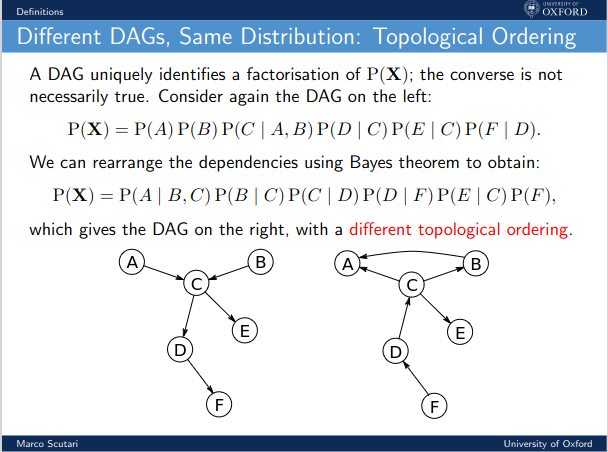
The nonuniqueness is of course very concerning. In recent years, there has been much handwringing in science about the Replication Crisis, in which scientists try to replicate the findings of an earlier published paper, and discover serious problems with the earlier results. Imagine the replication problems that can arise if authors of a paper present just one of many equally-credible DAGs, as is usually the case.
DAGs can indeed lead to valuable insight, but can be misleading as well. A healthy skepticism and a solid understanding of the concepts are mandatory for avoiding misleading or invalid results.
In spite of the fancy name machine learning, the methods discussed here, k-Nearest Neighbor estimation, random forests and gradient boosting, were originally developed in the statistics field, and have long been used by statisticians. There are many R packages that implement them.
We referred to the quantities \beta_i in the linear and logit models as “parameters.” These models are thus called parametric models. In each case, the regression function is modeled as linear, “S curve-shaped” and so on, that can be described with just a few parameters.
But assuming, say, that our regression function is approximately linear. It would be nice to have available methods that don’t rely on such assumptions.
Machine learning (ML) algorithms typically do not assume the regression function has any particular form. They are thus “safer,” though on the other hand they are less interpretable than, say, that \beta_2 quantity in our no-interactions linear model. Nor are standard errors available for regression function values at given points.
ML is mainly concerned with prediction, while we here are interested in estimation of effect sizes. However, ML algorithms either directly or indirectly do their prediction by estimating the regression function, as we do here, so they can be quite useful in our context of adjusting for the effects of confounders.
We’ll focus here on the k-Nearest Neighbor (kNN) algorithm, as it is the simplest to explain. Say we are predicting people’s weights, knowing only their heights. We have training data, on which we know both the height and weight of each person. Faced with a new case of a person 70.2 inches tall but with unknown weight, we find the people in our training set whose heights are close to 70.2 inches, and average their weights. That average is our predicted weight for the new person, as well as our estimate for the value of the regression function at height = 70.2.
How is “close to” defined? Should we look at the closest 5 people, the closest 50, or what? That number is k, the number of nearest neighbors. The number k here is called a hyperparameter of the algorithm. It’s chosen by the analyst, just like the analyst chooses the number of bins in plotting a histogram.
If in forming a histogram, we use too many bins, each bin may have a very small sample, thus producing a ragged graph. If we have too few bins, there may be rather disparate values in the same bin, producing a graph that is too smooth. In the extreme, using just one bin will produce a graph that is perfectly smooth but completely meaningless.
The situation with kNN is very similar. If k is too small, we average over a small sample; if it is too large, then we might be including data points that are far from, in the above situation, 70.2, thus not representative.
Typically k is chosen by trying several different values of k, then using the one that best predicts in a holdout set, described below. Once we’ve settled on k, we might use the full dataset, no holdout.
The qeML functions used by dsldML have an argument holdout. Say we set it to 1000 and our dataset has 5000 rows. Then the function will randomly partition our data into a training set of 4000 rows and the holdout set of 1000 rows. The given algorithm, say kNN, will fit the training data, and then use the result to predict the holdout data. The latter is considered “fresh” data, so we obtain an unbiased estimate of our predictive power.
We can then run the algorithm with various values of k, and settle on the one that predicts the holdout data best.
Let’s take kNN for a spin:
set.seed(9999)
z <- dsldML(svcensus,'wageinc','gender',
   qeMLftnName='qeKNN',opts=list(k=50))  # default holdout size
No sComparisonPts supplied; using rows: 10502, 19689, 13609, 12419, 14402print(z) $testAccs
female male
21336.37 27196.96
$comparisons
age educ occ wkswrkd female male
10502 37.43326 zzzOther 101 52 50614 65596
19689 47.75017 zzzOther 100 52 57420 61382
13609 42.46283 zzzOther 102 52 66122 83352
12419 46.67517 14 100 52 71954 85050
14402 52.66371 zzzOther 106 52 60590 73848The first three arguments are as usual. The fourth states that the ML algorithm we wish to use is kNN; the qeML package also includes random forests, boosting and neural networks. The opts argument states which non-default values we wish to use for arguments to the ML function; the default k actually is 25.
Nonparametric methods are inherently of the “with interactions” type. Thus there is no single value of the gender wage gap; instead, the gap will have different values at different X’s. Thus, as with the with-interactions case for linear models, the software reports the estimated wage gap here at a few comparison cases.
The comparison cases are by default a random sample of 5 rows of the supplied dataset. In order to obtain consistent results each time this book is processed by Quarto, we’ve called R’s set.seed function.
It’s important to keep in mind that the output here is not simply for 5 persons; each row represents a subpopulation. Thus for instance in that first row of output, we estimate among all Silicon Valley techies of age 37.4, in the ‘zzzOther’ education category, in occupation 101, and having worked 52 weeks, women’s average wage was 50,614 and for men it was 65,596.
As before, we see a substantial gender wage gap, but now we can feel more confident about it, since this analysis is unencumbered by assumptions on the form of the regression function.
In the above example, in which we are predicting wage income, a random forests (RF) analysis would generate a large number of decision trees. As explained below, each tree would give us a predicted income, and our final prediction would simply be the average of all those predicted values.
So, what is a decision tree? It’s just a flow chart. Consider this famous example involving vertebral disease. Y is categorical, with values NO (normal), SL and DH. To predict a new case, we look at the X variables (which have the nondescript names V1 through V6) one at a time, and branch through the tree accordingly.
For example, if the new case to be predicted has V6 of at least 16, we branch right, and immediately decide to predict that this patient’s disease status is SL. If on the other hand, V6 is less than 16, we look at V4. If it’s under 28, we immediately predict status DH, and so on.
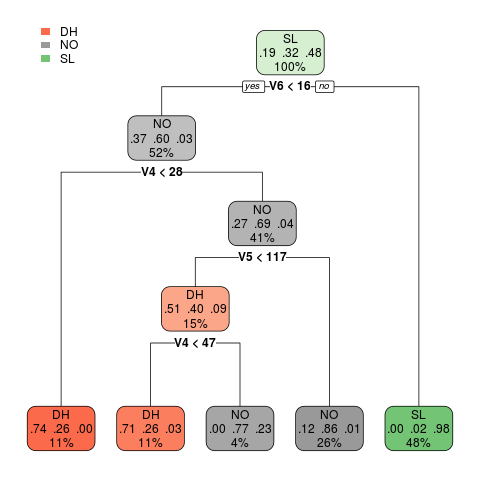
The tree is also giving us the conditional probabilities. For instance, the node at the far bottom left says that if a new case has V6 < 16 and V4 < 28, the estimated probabilities of this patient being of class DH, NO and SL are 0.74, 0.25 and 0.00, respectively. The numbers are the proportions of cases in our training set that fell into that node. (The 11% figure in that node is the proportion of all training set cases that fell into that node.)
RF typically has several hyperparameters, e.g. a limit on the number of levels in a tree, and the number of trees.
The order in which variables are considered in building a tree is random for each tree. So, while V6 is considered first in the tree displayed here, in some other tree it may be, say, V2. The split points, e.g. 16 in the root node in the picture, are also random. They are obtained through formulas that depend on the data in complex (though not terribly deep) ways.
This means there is quite a bit of randomness in a tree, so RF hedges its bets by generating many trees from our dataset, and then predicts new cases by averaging the predictions for that case from the individual trees. Let’s make that concrete via an example. Let’s run RF directly from the qeML function (to enable predictions), and then predict a hypothetical new case of a 32-year-old woman etc.:
set.seed(9999)
z <- qeRF(svcensus,'wageinc',holdout=NULL)
predict(z,data.frame(age=32,educ='zzzOther',occ='102',
   wkswrkd=52,gender='female'))
11
68568.46 RF generated 500 trees (the default in qeRF), generating 500 predictions for this hypothetical person, and averaged them.
As usual, the dsld wrapper adds S comparison information:
set.seed(9999)
w <- dsldML(svcensus,'wageinc','gender',
   qeMLftnName='qeRF')  # default values for hyperparameters
No sComparisonPts supplied; using rows: 10502, 19689, 13609, 12419, 14402w$testAccs
female male
20789.54 28338.22
$comparisons
age educ occ wkswrkd female male
10502 37.43326 zzzOther 101 52 52170.54 72335.88
19689 47.75017 zzzOther 100 52 47323.35 86818.07
13609 42.46283 zzzOther 102 52 71301.91 88116.20
12419 46.67517 14 100 52 57242.59 62986.42
14402 52.66371 zzzOther 106 52 58291.47 67260.14The code generated 500 trees, the default value, from our training set.
The most famous class of ML these days is of course neural networks, especially the refined version deep learning. These have been found highly useful in image recognition and language processing.
In contrast to these fields of application, the ML people refer to the types of data we see in this book, where each row represents, say, one person, as tabular data. Their go-to method for such data is gradient boosting (GB), more specifically XGBoost, accessible in qeML via qeXGBoost. GB is again a tree-based method, but it works by starting with a primitive tree and repeatedly refining it.